So one thing that I miss having on my computers at home is proper remote management of the device. Yes, I have my servers setup so that I can ssh into them and get access to things but out of the box you can’t access things like the BIOS or do a reload of the OS without having to be physically present in front of the device.
I’ve been keeping eyes on a couple of devices that should help with this type of problem, and a opportunity came up where I was able to grab a Sipeed device for a decent price and I decided to give the thing a try and see if it scratched my need for physical level remote access.
The specific device that I picked up was the NanoKVM-PCIe device.
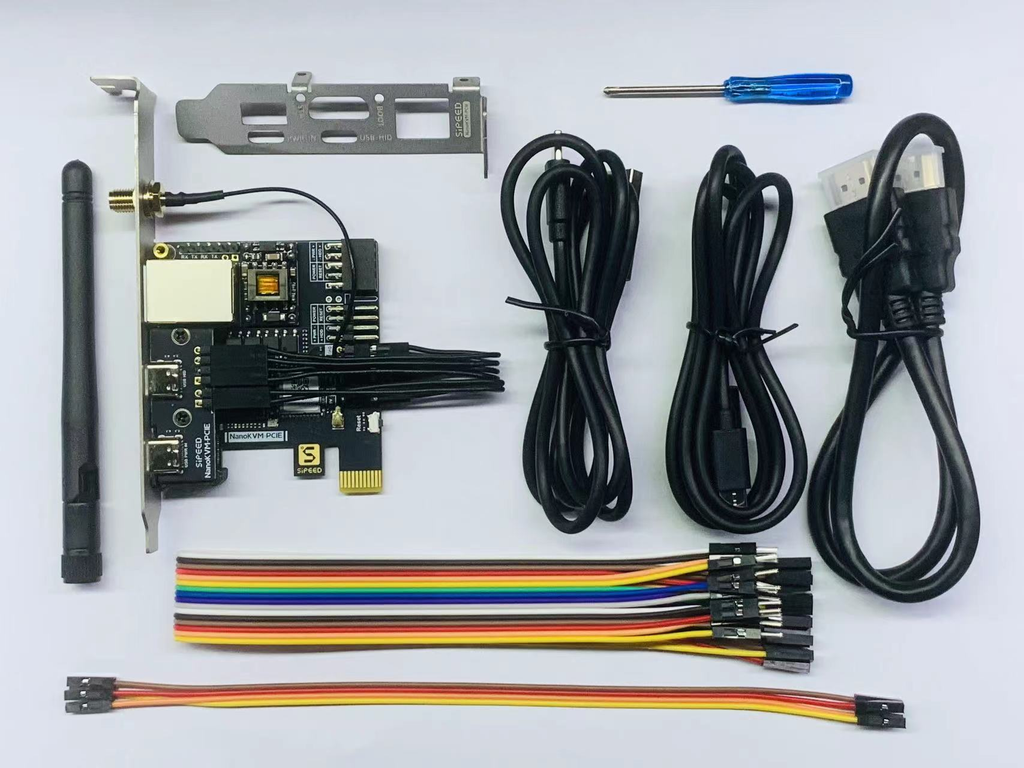
A lot of these devices come in a external package, this one caught my eye because it’s something that I can tuck into the case and not have to worry about having it floating around. Yes this is a little less flexible since I can’t move it around like a external device could, but it also means that I don’t need a daughterboard to be able to control the hosts power.
Wiring it up wasn’t anything specifically hard, internally you put it in line with the front panel header for your power, reset, and indicator LED’s and then run a HDMI cable between the monitor and the NanoKVM and you are almost ready to go. You still have to get a USB connection to emulate a keyboard and mouse, and that can be done using internal connectors or a external jumper. In my system there are no more internal USB connectors so I’ve got a USB A to C cable connecting the card to the rest of the system.
The card can pull power from the computer through the PCIe connector, and you can wire up a external power source through one of the USB-C ports on the back so that the device keeps running even if you turn off the host machine. There is a option that you can get that will power these over POE, but since I don’t have a POE switch I didn’t bother paying the extra for that.
The last part is the network connection. Mine’s just got the option to do wired ethernet, but there are some versions that have WIFI as a option, but again I don’t think that’s something that’s a huge bonus for me.
So after getting the thing wired up and installed I let it boot up and grab a IP address so that I could see what’s up with it. The interesting thing about this is that it’s got a little OLED on the back that shows you what the current IP address and connection status is. Handy since that means I’m not having to dig into my router to look for the device and find what address it picked up.
And once I got logged in and changed my password and user name it was all fairly straightforward. None of the configuration options are specifically esoteric and to be honest there’s not a lot of them. Strangely enough there isn’t even a option in the UI to set a static IP address, if you want one you have to either reserve it on the router side of things or you have to configure it in the terminal on the device itself.
The device does have a option however to tie into TailScale directly so that nice. Although it’s apparently a version that’s out of date.
The one thing that I will note is that these devices were initially flagged as having some security concerns. Some of those concerns are things that don’t really give me much pause – specifically the hardcoding of Google’s public DNS servers (I use those anyhow). However there were some things noted that were a concern, specifically how some of them had a microphone embedded on the device. Turns out that’s because the board they were using is a repurposed development board that happened to have a microphone on it and that fact just seemed to be missed by a lot of people.
The manufacturer did post back a response on this shortly after the concerns came to light;
https://github.com/sipeed/NanoKVM/issues/301
And looking through the list of issues it seems like the vendor has been addressing them, and at this point I’m not terribly worried about the device in my network. Granted it’s on a VLAN that has no access to the outside world, but that’s something that I would be doing regardless of who made the card in the first place.
At this point I think that the thing works well enough for what I’m doing, and some more may wind up finding their way into some of the other machines that I’m working with at home since getting servers with “proper” IPMI cards installed is well outside of my price range.